---
categories: [Split-plot ANOVA, MANOVA, Repeated measures] # Add your categories here
image: /assets/L9card.png # change the image path
---
# Repeated Measures Analysis
## Overview {.unnumbered .unlisted}
Repeated measures data comes from experiments where you take observations repeatedly over time. Under a repeated measures experiment, experimental units are observed at multiple points in time. So instead of looking at an observation at one point in time, we will look at data from more than one point in time. With this type of data, we are looking at only a single response variable but measured over time.
In the univariate setting, we generally could expect the responses over time to be temporally correlated. Observations collected at points in time close together are more likely to be similar to one another than observations collected far apart from one another. Essentially what we are going to do here is to treat observations collected at different points in time as if they were different variables - this is the multivariate analysis approach. You will see that there will be two distinctly different approaches that are frequently considered in this analysis. One of which involves a univariate analysis.
We will use the following experiment to illustrate the statistical procedures associated with repeated measures data.
::: {#exm-example-9-1}
### Dog Experiment
In this experiment, we had a completely randomized block experimental design that was carried out to determine the effects of 4 surgical treatments on coronary potassium in a group of 36 dogs. There are 9, 8, 9, and 10 dogs in each group, respectively. Each dog was measured at four different points in time following one of four experimental treatments:
1. Control - no surgical treatment is applied
2. Extrinsic cardiac denervation immediately prior to treatment.
3. Bilateral thoracic sympathectomy and stellectomy 3 weeks prior to treatment.
4. Extrinsic cardiac denervation 3 weeks prior to treatment.
Coronary sinus potassium levels were measured at 1, 5, 9, and 13 minutes following a procedure called an occlusion. We are looking at the effect of the occlusion on the coronary sinus potassium levels following different surgical treatments.
#### Approaches {.unnumbered .unlisted}
There are a number of approaches to consider here in order to analyze this type of data. The first of these has been proposed before the advent of modern computing so that it might be carried out using hand calculations. There are two very common historical approaches that one could take to address the analysis.
1. Split-plot *ANOVA* - this is perhaps the most common approach.
2. *MANOVA* - this is what we will focus on in this lesson.
:::
::: {.callout-caution appearance="minimal"}
### Notation in this Lesson {.unnumbered .unlisted}
- $Y_{ijk}$= Potassium level for treatment *i* in dog *j* at time *k*
- *a* \= Number of treatments
- $n_{i}$ = Number of replicates of treatment *i*
- $N=n_{1}+n_{2}+\ldots+n_{a}$ \= Total number of experimental units
- *t* \= Number of observations over time
:::
::: {.objectiveblock}
### <i class="bi bi-check2-circle"></i>Objectives {.unnumbered .unlisted}
Upon completion of this lesson, you should be able to:
1. Use a split-plot ANOVA to test for interactions between treatments and time, and the main effects of treatments and time;
2. Use a MANOVA to assess test for interactions between treatments and time, and for the main effects of treatments;
3. Understand why the split-plot ANOVA may give incorrect results; and
4. Understand the shortcomings of the application of MANOVA to repeated measures data.
:::
## Approach 1: Split-plot ANOVA
The Split-plot *ANOVA* is perhaps the most traditional approach, for which hand calculations are not too unreasonable. It involves modeling the data using the linear model shown below:
$$
\textbf{Model: }Y_{ijk}=\mu+\alpha_i+\beta_{j(i)}+\tau_k+(\alpha\tau)_{ik}+\epsilon_{ijk}
$$
Using this linear model we are going to assume that the data for treatment *i* for dog *j* at time *k* is equal to an overall mean μ plus the treatment effect $\alpha_i$, the effect of the dog within that treatment $\beta_{j \left( i \right)}$, the effect of time $τ_k$, the effect of the interaction between time and treatment $\left(\alpha\tau \right)_{ik}$, and the error $\varepsilon_{ijk}$.
Such that:
- $\mu$ = overall mean
- $\alpha_i$ = effect of treatment *i*
- $\beta_{j \left( i \right)}$ = random effect of dog *j* receiving treatment *i*
- $\tau_{k}$= effect of time *k*
- $\left( \alpha \tau \right)_{ik}$ = treatment by time interaction
- $\varepsilon_{ijk}$ = experimental error
### Assumptions: {.unnumbered .unlisted}
We are going to make the following assumptions about the data:
1. The errors $\varepsilon_{ijk}$ are independently sampled from a normal distribution with mean 0 and variance $\sigma^2_{\epsilon}$.
2. The individual dog effects $\beta_{j \left( i \right)}$ are also independently sampled from a normal distribution with mean 0 and variance $\sigma^2_{\beta}$.
3. The effect of time does not depend on the dog; that is, there is no time-by-dog interaction. Generally,
4. we need to have this assumption otherwise the results would depend on which animal you were looking at - which would mean that we could not predict much for new animals.
With these assumptions, the random effect of the dog and fixed effects for treatment and time is called a mixed-effects model.
The analysis is carried out in this Analysis of Variance Table shown below:
| Source | d.f | SS | MS | F |
| :--- |:---: |:---: |:---: |:---: |
| Treatment | $a - 1$ | $SS_{\text {treat}}$|$\dfrac{\mathrm{SS}_{\text{treat}}}{a-1}$ | $\dfrac {\mathrm{MS}_{\text{treat}}}{\mathrm{MS}_{\text{error}(a)}}$ |
| Error (a) | $N - a$ | $SS_{\text{error(a)}}$ | $\dfrac {SS_{\text{error}(a)}}{(N-a)}$ | |
| Time | $t - 1$ | $SS_{\text {time}}$|$\dfrac{SS_{\text{time}}}{(t-1)}$ | $\dfrac{\mathrm{MS}_{\text{time}}}{\mathrm{MS}_{\text{error}(b)}}$ |
| Treat x Time | $\left(a-1)(t-1\right)$ | $SS_{\text{treatxtime}}$ | $\dfrac{SS_{\text{treatxtimes}(b)}} { (a-1)(t-1)}$ | $\dfrac{\mathrm{MS}_{\text{treatxtime}}}{\mathrm{MS}_{\text{error}(b)}}$ |
| Error (b) | $\left(N-a)(t-1\right)$ | $SS_{\text {error(b)}}$|$\dfrac{SS_{\text{error}(b)}}{(N-a)(t-1)}$|- |
| Total | $Nt - 1$ | $SS_{\text{total}}$ |- | - |
: {.w-auto .table-sm .mx-auto .row-header .table-responsive}
where,
- *a*: the number of treatments
- *N*: the total number of all experimental units
- *t*: number of time points
The sources of the variation include treatment; Error (a); the effect of Time; the interaction between time and treatment; and Error (b). Error (a) is the effect of subjects within treatments and Error (b) is the individual error in the model. All these add up to the total.
::: {.callout-note appearance="minimal"}
#### Sum of Squares Formulas
Here are the formulas that are used to calculate the various Sums of Squares involved:
$$
\begin{array}{lll}SS_{total}& =& \sum_{i=1}^{a}\sum_{j=1}^{n_i}\sum_{k=1}^{t}Y^2_{ijk}-Nt\bar{y}^2_{...}\\SS_{treat} &= &t\sum_{i=1}^{a}n_i\bar{y}^2_{i..} - Nt\bar{y}^2_{...}\\SS_{error(a)}& =& t\sum_{i=1}^{a}\sum_{j=1}^{n_i}\bar{y}^2_{ij.} - t\sum_{i=1}^{a}n_i\bar{y}^2_{i..}\\SS_{time}& =& N\sum_{k=1}^{t}\bar{y}^2_{..k}-Nt\bar{y}^2_{...}\\SS_{\text{treat x time}} &=& \sum_{i=1}^{a}\sum_{k=1}^{t}n_i\bar{y}^2_{i.k} - Nt\bar{y}^2_{...}-SS_{treat} -SS_{time}\end{array}
$$
:::
Mean Square (*MS*) is always derived by dividing the Sum of Square term by the corresponding degrees of freedom.
To get the main effects of the treatment we compare the *MS* treatment to *MS* error (*a*)
We will compare these results with the results we get from the *MANOVA*, the next approach covered in this lesson.
## Example
::: {#exm-example-9-2}
Download the text file containing the data: ([dog1.csv](data_files/dog1.csv){download="" target="_blank"}).
::: {.panel-tabset}
### {.icon-image} SAS Example
We will use the following SAS program below to illustrate this procedure.
Download the SAS Program here: ([dog2.sas](data_files/dog2.sas){download="" target="_blank"})
::: {.callout-tip collapse="true" title="Explore the Code" icon="false"}
```SAS
options ls=78;
title "Split-Plot Analysis - Dog Data";

/* After reading in the dog1 data, the variables are stacked
  * into two columns, one named 'time' for the time points and
  * one named 'k' for the quantitative response values.
  * The original p1 through p4 responses are removed.
  */

data dogs;
  infile "D:\Statistics\STAT 505\data\dog1.csv" firstobs=2 delimiter=',';
  input treat dog p1 p2 p3 p4;
  time=1;  k=p1; output;
  time=5;  k=p2; output;
  time=9;  k=p3; output;
  time=13; k=p4; output;
  drop p1 p2 p3 p4;
  run;

 /* The class statement specifies treat, dog, and time
  * as categorical variables.
  * The model statement specifies k as the response and
  * treat, time, and treat-by-time interaction as factors.
  * dog (nested within treat) is also specified as a factor.
  * The h= option in the test statement is used to specify over
  * which groups the mean responses are to be compared.
  * The e= option specifies the error term for the test specified
  * in the test statement, which is treat here.
  */

proc glm data=dogs;
  class treat dog time;
  model k=treat dog(treat) time treat*time;
  test h=treat e=dog(treat);
  run;
```
:::
### {.icon-image} Minitab Example
#### Split-plot Model {.unnumbered .unlisted}
To fit the split-plot model:
1. Open the *dog1* data set in a new worksheet.
2. Rename the columns *treat*, *dog*, *p1*, *p2*, *p3*, and *p4*, from left to right.
3. **Data > Stack > Blocks of Columns**
a. Highlight and select *treat*, *dog*, and *p1* to move them to the first window on the right.
b. Repeat sub-step a with *treat*, *dog*, and *p2* to move them to the second window on the right.
c. Repeat sub-step a again for the remaining responses *p3* and *p4*.
4. Select **New worksheet** and choose **OK**. The new worksheet containing the stacked data is created.
5. On the new worksheet, rename the columns *time*, *treat*, *dog*, and *response*, from left to right. This step is optional but assumed for the steps below.
6. **Stat > ANOVA > General Linear Model > Fit General Linear Model**
a. Highlight and select *response* to move it to the **Responses** window.
b. Highlight and select *time*, *treat*, and *dog* to move them to the **Factors** window.
c. Under **Random/Nest**, specify *dog* nested in *treat* and set *dog* as **Random** in the pull-down menu. Leave *time* and *treat* as **Fixed**, then choose **OK**.
d. Under **Model**, highlight *treat* and *time*, then choose **Add with interaction order 2**. The *treat × time* interaction term is added to the **Terms** window. Choose **OK**.
e. Choose **OK** again. The split-plot model results are displayed in the results area.
:::
#### Analysis {.unnumbered .unlisted}
Run the SAS program inspecting how the program applies this procedure.
Note in the output where values of interest are located. The results are copied from the SAS output into this table:
| Source | d.f. | SS | MS | F |
| :--- |:---: |:---: |:---: |:---: |
| Treatment | 3 | 19.923 | 6.641 | 6.00 |
| Error (a) | 32 | 35.397 | 1.106 | |
| Time | 3 | 6.204 | 2.068 | 11.15 |
| Interaction | 9 | 3.440 | 0.382 | 2.06 |
| Error (b) | 96 | 17.800 | 0.185 | |
| Total | 143 | 82.320 | | |
: {.w-auto .table-sm .mx-auto .row-header}
### Hypotheses Tests {.unnumbered .unlisted}
Now that we have the results from the analysis, the first thing that we want to look at is the interaction between treatment and time. We want to determine here if the effect of treatment depends on time. Therefore, we will start with:
1. The interaction between treatment and time, or:
$$
H_0\colon(\alpha\tau)_{ik} = 0 \text{ for all } i = 1,2, \dots, a; k = 1,2, \dots, t$$
Here we need to look at the treatment by interaction term whose *F*\-value is reported at 2.06. We want to compare this to an *F*\-distribution with $(a-1)(t-1)= 9$ and $(N-a)(t-1)= 96$ degrees of freedom. The numerator *d.f.* of 9 is tied to the source variation due to the interaction, while the denominator *d.f.* is tied to the source of variation due to error(b).
We can reject $H_0$ at level alpha; if
$$F = \dfrac{MS_{\text{treat x time}}}{MS_{error(b)}} > F_{(a-1)(t-1), (N-a)(t-1), \alpha}$$
Therefore, we want to compare this to an *F* with 9 and 96 degrees of freedom. Here we see that this is significant with a *p*\-value of 0.0406.
**Result:** We can conclude that the effect of treatment depends on time (*F* \= 2.06; *d. f.* \= 9, 96; *p* \= 0.0406)
Next Steps...
- Because the interaction between treatment and time is significant, the next step in the analysis would be to further explore the nature of that interaction using something called profile plots, (we will look at this later...).
- If the interaction between treatment and time was not significant, the next step in the analysis would be to test for the main effects of treatment and time.
2. Let's suppose that we had not found a significant interaction. Let's do this so that you can see what it would look like to consider the effects of treatment.
Consider testing the null hypothesis that there are no treatment effects, or
$$
H_0\colon \alpha_1 = \alpha_2 = \dots = \alpha_a = 0
$$
To test this null hypothesis, we compute the *F*\-ratio between the Mean Square for Treatment and Mean Square for Error (a). We then reject our $H_0$ at level $\alpha$; if
$$F = \dfrac{MS_{treat}}{MS_{error(a)}} > F_{a-1, N-a, a}$$
Here, the numerator degrees of freedom is equal to the number of degrees of freedom *a* \- 1 = 3 for treatment, while the denominator degrees of freedom are equal to the number of degrees of freedom $N-a= 32$ for Error(a).
**Result:** We can conclude that the treatment significantly affects the mean coronary sinus potassium over the *t* \= 4 sampling times (*F* \= 6.00; *d. f.* \= 3,32; *p* \= 0.0023).
3. Consider testing the effects of time:
$$
H_0\colon \tau_1 = \tau_2 = \dots = \tau_t = 0
$$
To test this null hypothesis, we compute the *F*\-ratio between Mean Square for Time and Mean Square for Error(b). We then reject $H_0$ at level $\alpha$; if
$$
F = \dfrac{MS_{time}}{MS_{error(b)}} > F_{t-1, (N-a)(t-1), \alpha}$$
Here, the numerator degrees of freedom is equal to the number of degrees of freedom $t-1=3$ for time, while the denominator degrees of freedom is equal to the number of degrees of freedom $(N-a)(t-1)= 96$ for Error(b).
**Result:** We can conclude that coronary sinus potassium varies significantly over time (*F* \= 11.15; *d. f.* \= 3, 96; *p* < 0.0001).
:::
## Some Criticisms about the Split-ANOVA Approach
This approach and these results assume a constant correlation between any two observations from the same dog. This assumption is unlikely because, typically, when you have repeated measurements over time, the data from the same subject at two different points in time are temporally correlated. In principle, observations that are collected at times that are close together are going to be more similar to one another than observations that are far apart.
This motivates an alternative approach, which is to treat this situation as a Multivariate Analysis of Variance problem instead of an Analysis of Variance problem.
## Approach 2: MANOVA
When taking a multivariate approach, we collect the observations over time from the same dog, dog *j* receiving treatment *i* into a vector:
$$
\mathbf{Y}_{ij} = \left(\begin{array}{c}Y_{ij1}\\ Y_{ij2} \\ \vdots\\ Y_{ijt}\end{array}\right)
$$
We treat the data collected at different points in time as if it were data from different variables. Basically, we have a vector of observations for dog *j* receiving treatment *i* and each entry corresponds to data collected at a particular point in time.
The usual assumptions are made for a one-way *MANOVA*. In this case:
1. Dogs receiving treatment *i* have common mean vector $\mu_{i}$
2. All dogs have a common variance-covariance matrix $\Sigma$
3. Data from different dogs are independently sampled
4. Data are multivariate normally distributed
### The Analysis {.unnumbered .unlisted}
**Step 1**: Use a *MANOVA* to test for overall differences between the mean vectors of the four different observations and the treatments.
::: {.panel-tabset}
#### {.icon-image} SAS Example
We will use the Dog SAS program to perform this multivariate analysis.
::: {.callout-tip collapse="true" title="Explore the Code" icon="false"}
```SAS
options ls=78;
title "Repeated Measures - Coronary Sinus Potassium in Dogs";


data dogs;
  infile "D:\Statistics\STAT 505\data\dog1.csv" firstobs=2 delimiter=',';
  input treat dog p1 p2 p3 p4;
  run;

proc print data=dogs;
  run;

 /* The class statement specifies treat as a categorical variable.
  * The model statement specifies p1 through p4 as the responses
  * and treat as the factor.
  * The h= option in the manova statement is used to specify over
  * which groups the mean response vectors are to be compared.
  * The m= option specifies the transformation (if any) to be
  * applied to the responses before the means are calculated.
  */

proc glm data=dogs;
  class treat;
  model p1 p2 p3 p4=treat;
  manova h=treat / printe;
  manova h=treat m=p1+p2+p3+p4;
  manova h=treat m=p2-p1,p3-p2,p4-p3;
  run;
```
:::
#### {.icon-image} Minitab Example
##### MANOVA approach {.unnumbered .unlisted}
To fit the *MANOVA* model and test for equal mean vectors:
1. Open the *dog1* data set in a new worksheet.
2. Rename the columns *treat*, *dog*, *p1*, *p2*, *p3*, and *p4*, from left to right.
3. **Stat > ANOVA > MANOVA**
a. Highlight and select *p1* through *p4* to move them to the **Responses** window.
b. Highlight and select *treat* to move it to the **Model** window.
c. Choose **OK**. The results for the MANOVA test are displayed in the results area.
:::
We use the glm procedure to analyze these data. In this case, we look at a one-way *MANOVA*. We only really have one classification variable - treatment.
The model statement includes the variables of interest on the left-hand side of the equal sign. In this case, they are *p1*, *p2*, *p3*, and *p4*, (the potassium levels at four different points in time). We put the explanatory variable, treatment, on the right-hand side of the equal sign.
The first *MANOVA* statement tests the hypothesis that the mean vector of observations over time does not depend on treatment. The print option asks for the error of sums of squares and cross-products matrix as well as the partial correlations.
The second *MANOVA* statement tests for the main effects of treatment. We'll return to this later.
The third *MANOVA* statement tests for the interaction between treatment and time. We'll also return to this later.
Right now, the result that we want to focus on is the Wilks Lambda of 0.484, and the corresponding *F*\-approximation of 2.02 with 12, 77 *d.f.* A *p*\-value of 0.0332 indicates that we can reject the null hypothesis that there is no treatment effect.
**Our Conclusion at this point:** There are significant differences between at least one pair of treatments in at least one measurement of time $\left( \Lambda = 0.485; F = 2.02; d.f. = 12, 77; p = 0.0332 \right)$.
### Next Steps... {.unnumbered .unlisted}
If we find that there is a significant difference, then with repeated measures data we tend to focus on a couple of additional questions:
- **First Question**
Is there a significant treatment by time interaction? Or, in other words, does the effect of treatment depend on the observation time? Previously in the *ANOVA* analysis, this question was evaluated by looking at the *F*\-value, 2.06. This was reported as a significant result. If we find that this is a significant interaction, the next thing we need to address is, what is the nature of that interaction.
- **Alternative Question**
If we do not find a significant interaction, then we can collapse the data and determine if the average sinus potassium level over time differs significantly among treatments. Here, we are looking at the main effects of treatment.
Let's proceed...
## Step 2: Test for treatment by time interactions
::: {.panel-tabset}
### {.icon-image} SAS Example
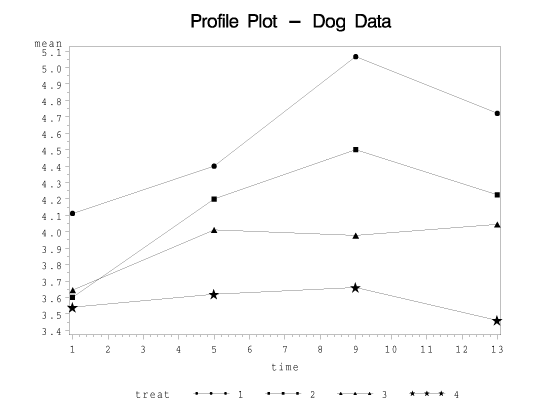
To test for treatment by time interactions we need to carry out a Profile Analysis. We can create a Profile Plot as shown in the Dog SAS program. (This program is similar in structure to swiss13a.sas used in [Hotelling's T-square lesson](Lesson07.qmd) previously.)
Here, we want to plot the treatment means against time for each of our four treatments. We can then examine the form the interactions take if they are deemed significant.
::: {.callout-tip collapse="true" title="Explore the Code" icon="false"}
```SAS
options ls=78;
title "Profile Plot - Dog Data";

 /* After reading in the dog1 data, the variables are stacked
  * into two columns, one named 'time' for the time points and
  * one named 'k' for the quantitative response values.
  * The original p1 through p4 responses are removed.
  */

data dogs;
  infile "D:\Statistics\STAT 505\data\dog1.csv" firstobs=2 delimiter=',';
  input treat dog p1 p2 p3 p4;
  time=1;  k=p1; output;
  time=5;  k=p2; output;
  time=9;  k=p3; output;
  time=13; k=p4; output;
  drop p1 p2 p3 p4;
  run;

 /* This sorts the data by both treat and time.
  * The priority is to sort by treat first, then time
  */

proc sort data=dogs;
  by treat time;
  run;

 /* This calculates the mean response k for each level
  * of treat and time. The results are saved in a separate
  * file called 'a' with means stored as 'mean'.
  */

proc means data=dogs;
  by treat time;
  var k;
  output out=a mean=mean;

filename t1 "dog.ps";
goptions device=ps300 gsfname=t1 gsfmode=replace;

 /* The axis commands define the size of the plotting window.
  * The plot statement specifies the mean for each time and treat
  * are to be plotted but with separate lines for treat.
  * Each treat group is given a different symbol for distinction.
  * /

proc gplot;
  axis1 length=4 in;
  axis2 length=6 in;
  plot mean*time=treat / vaxis=axis1 haxis=axis2;
  symbol1 v=J f=special h=2 i=join color=black;
  symbol2 v=K f=special h=2 i=join color=black;
  symbol3 v=L f=special h=2 i=join color=black;
  symbol4 v=M f=special h=2 i=join color=black;
  run;
```
:::
### {.icon-image} Minitab Example
#### Repeated measures profile plot {.unnumbered .unlisted}
To create a profile plot for the repeated measures model:
1. Open the *dog1* data set in a new worksheet.
2. Rename the columns *treat*, *dog*, *p1*, *p2*, *p3*, and *p4*, from left to right.
3. **Graph > Line Plot > Multiple Y’s**
a. Highlight and select *p1* through *p4* to move them to the **Graph** window.
b. Highlight and select *treat* to move it to the **Categorical variable** window.
c. Choose **OK**. The profile plot is displayed in the results area.
:::
This program plots the treatment means against time, separately for each treatment. Here, the means for treatment 1 are given by the circles, treatment 2 squares, treatment 3 triangles, and treatment 4 stars.
{#fig-sas_plot_01 fig-alt="SAS Profile Plot for the Dog Data" .mx-auto .d-block width="60%" .lightbox}
The test for interaction tests the hypothesis that these line segments are parallel to one another.
To test for interaction, we define a new data vector for each observation. Here we consider the data vector for dog *j* receiving treatment *i*. This data vector is obtained by subtracting the data from time 2 minus the data from time 1, the data from time 3 minus the data from time 2, and so on...
This yields the vector of differences between successive times and is expressed as follows:
$$
\mathbf{Z}_{ij} = \left(\begin{array}{c}Z_{ij1}\\ Z_{ij2} \\ \vdots \\ Z_{ij, t-1}\end{array}\right) = \left(\begin{array}{c}Y_{ij2}-Y_{ij1}\\ Y_{ij3}-Y_{ij2} \\ \vdots \\Y_{ijt}-Y_{ij,t-1}\end{array}\right)
$$
Because this vector is a function of the random data, it is a random vector, and so has a population mean. Thus, for treatment *i*, we define the population mean vector $E(\mathbf{Z}_{ij}) = \boldsymbol{\mu}_{Z_i}$.
Then we will perform a *MANOVA* on these $Z_{ij}$'s to test the null hypothesis that
$$H_0\colon \boldsymbol{\mu}_{Z_1} = \boldsymbol{\mu}_{Z_2} = \dots = \boldsymbol{\mu}_{Z_a}$$
::: {.panel-tabset}
### {.icon-image} SAS Example
The SAS program carries out this *MANOVA* procedure in the third *MANOVA* statement as highlighted below:
::: {.callout-tip collapse="true" title="Explore the Code" icon="false"}
```SAS
options ls=78;
title "Repeated Measures - Coronary Sinus Potassium in Dogs";


data dogs;
  infile "D:\Statistics\STAT 505\data\dog1.csv" firstobs=2 delimiter=',';
  input treat dog p1 p2 p3 p4;
  run;

proc print data=dogs;
  run;

 /* The class statement specifies treat as a categorical variable.
  * The model statement specifies p1 through p4 as the responses
  * and treat as the factor.
  * The h= option in the manova statement is used to specify over
  * which groups the mean response vectors are to be compared.
  * The m= option specifies the transformation (if any) to be
  * applied to the responses before the means are calculated.
  */

proc glm data=dogs;
  class treat;
  model p1 p2 p3 p4=treat;
  manova h=treat / printe;
  manova h=treat m=p1+p2+p3+p4;
  manova h=treat m=p2-p1,p3-p2,p4-p3;
  run;
```
:::
### {.icon-image} Minitab Example
To fit the *MANOVA* model and test for interaction effect
1. Open the *dog1* data set in a new worksheet.
2. Rename the columns *treat*, *dog*, *p1*, *p2*, *p3*, and *p4*, from left to right.
3. Name new columns in the worksheet *diff12*, *diff23*, and *diff34*. These columns are used in the steps below.
4. **Calc > Calculator**
a. Highlight and select *diff12* to move it to the **Store result** window.
b. In the **Expression** window, enter *p1 - p2*, then choose **OK**. The first difference appears in the *diff12* column in the worksheet.
c. Repeat sub-steps a and b using *diff23* in the **Store result** window and *p2 - p3* in the **Expression** window.
d. Repeat sub-steps a and b using *diff34* in the **Store result** window and *p3 - p4* in the **Expression** window.
5. **Stat > ANOVA > MANOVA**
a. Highlight and select *diff12*, *diff23*, and *diff34* to move them to the **Responses** window.
b. Highlight and select *treat* to move it to the **Model** window.
c. Choose **OK**. The results for the interaction test are displayed in the results area.
:::
In the third *MANOVA* statement, we are testing for interaction between treatment and time. We obtain the vector Z, by setting m equal to the differences between the data at different times. i.e., $p2-p1$, $p3-p2,$ and $p4-p3.$ This will carry out the profile analysis, or equivalently, test for interactions between treatment and time.
Let's look at the output. Again, be careful when you look at the results to make sure you are in the right part of the output.
::: {.sas-output}
```{=html}
<section data-name="GLM" data-sec-type="proc">
<div id="IDX" class="systitleandfootercontainer" style="border-spacing: 1px">
<p><span class="c systemtitle">Repeated Measures - Coronary Sinus Potassium in Dogs</span> </p>
</div>
<div class="proc_title_group">
<p class="c proctitle">The GLM Procedure</p>
<p class="c proctitle">Multivariate Analysis of Variance</p>
</div>
<h1 class="contentprocname toc">The GLM Procedure</h1>
<section>
<h1 class="contentfolder toc">Multivariate Analysis of Variance</h1>
<article aria-label="Transformation Matrix">
<h1 class="contentitem toc">Transformation Matrix</h1>
<table class="table" style="border-spacing: 0" aria-label="Transformation Matrix">
<caption aria-label="Transformation Matrix"></caption>
<colgroup><col></colgroup><colgroup><col><col><col><col></colgroup>
<thead>
<tr>
<th class="c b header" colspan="5" scope="colgroup">M Matrix Describing Transformed Variables</th>
</tr>
<tr>
<th class="c headerempty" scope="col"> </th>
<th class="r b header" scope="col">p1</th>
<th class="r b header" scope="col">p2</th>
<th class="r b header" scope="col">p3</th>
<th class="r b header" scope="col">p4</th>
</tr>
</thead>
<tbody>
<tr>
<th class="rowheader" scope="row">MVAR1</th>
<td class="r data" style="white-space: nowrap">-1</td>
<td class="r data">1</td>
<td class="r data">0</td>
<td class="r data">0</td>
</tr>
<tr>
<th class="rowheader" scope="row">MVAR2</th>
<td class="r data">0</td>
<td class="r data" style="white-space: nowrap">-1</td>
<td class="r data">1</td>
<td class="r data">0</td>
</tr>
<tr>
<th class="rowheader" scope="row">MVAR3</th>
<td class="r data">0</td>
<td class="r data">0</td>
<td class="r data" style="white-space: nowrap">-1</td>
<td class="r data">1</td>
</tr>
</tbody>
</table>
</article>
</section>
</section>
```
:::
Find the table with the kind of function used in defining the vector *MVAR*, comprised of the elements *MVAR1*, *MVAR2*, and *MVAR3*.
For *MVAR1* we have minus *p1* plus *p2*, for *MVAR2* we have minus *p2* plus *p3*, and so on...
The results are then found below this table in the SAS output:
::: {.sas-output}
```{=html}
<section data-name="GLM" data-sec-type="proc">
<div id="IDX" class="systitleandfootercontainer" style="border-spacing: 1px">
<p><span class="c systemtitle">Repeated Measures - Coronary Sinus Potassium in Dogs</span> </p>
</div>
<div class="proc_title_group">
<p class="c proctitle">The GLM Procedure</p>
<p class="c proctitle">Multivariate Analysis of Variance</p>
</div>
<h1 class="contentprocname toc">The GLM Procedure</h1>
<section>
<h1 class="contentfolder toc">Multivariate Analysis of Variance</h1>
<section>
<h1 class="contentfolder toc">Model MANOVA</h1>
<section>
<h1 class="contentfolder toc">treat</h1>
<article aria-label="Multivariate Tests">
<h1 class="contentitem toc">Multivariate Tests</h1>
<table class="table" style="border-spacing: 0" aria-label="Multivariate Tests">
<caption aria-label="Multivariate Tests"></caption>
<colgroup><col></colgroup><colgroup><col><col><col><col><col></colgroup>
<thead>
<tr>
<th class="c b header" colspan="6" scope="colgroup">MANOVA Test Criteria and F Approximations for the Hypothesis of No Overall treat Effect<br>on the Variables Defined by the M Matrix Transformation<br>H = Type III SSCP Matrix for treat<br>E = Error SSCP Matrix<br><br>S=3 M=-0.5 N=14</th>
</tr>
<tr>
<th class="b header" scope="col">Statistic</th>
<th class="r b header" scope="col">Value</th>
<th class="r b header" scope="col">F Value</th>
<th class="r b header" scope="col">Num DF</th>
<th class="r b header" scope="col">Den DF</th>
<th class="r b header" scope="col">Pr > F</th>
</tr>
</thead>
<tfoot>
<tr>
<th class="c b footer" colspan="6">NOTE: F Statistic for Roy's Greatest Root is an upper bound.</th>
</tr>
</tfoot>
<tbody>
<tr>
<th class="rowheader" scope="row">Wilks' Lambda</th>
<td class="r data" style="background-color: #fdecef;">0.59835958</td>
<td class="r data" style="background-color: #fdecef;">1.91</td>
<td class="r data" style="background-color: #fdecef;">9</td>
<td class="r data" style="background-color: #fdecef;">73.163</td>
<td class="r data" style="background-color: #fdecef;">0.0637</td>
</tr>
<tr>
<th class="rowheader" scope="row">Pillai's Trace</th>
<td class="r data">0.44352640</td>
<td class="r data">1.85</td>
<td class="r data">9</td>
<td class="r data">96</td>
<td class="r data">0.0689</td>
</tr>
<tr>
<th class="rowheader" scope="row">Hotelling-Lawley Trace</th>
<td class="r data">0.60246548</td>
<td class="r data">1.96</td>
<td class="r data">9</td>
<td class="r data">44.068</td>
<td class="r data">0.0672</td>
</tr>
<tr>
<th class="rowheader" scope="row">Roy's Greatest Root</th>
<td class="r data">0.46206108</td>
<td class="r data">4.93</td>
<td class="r data">3</td>
<td class="r data">32</td>
<td class="r data">0.0063</td>
</tr>
</tbody>
</table>
</article>
</section>
</section>
</section>
</section>
```
:::
Here we get a Wilks Lambda of 0.598 with a supporting *F*\-value of 1.91 with 9 and 73 *d.f.*
This *p*\-value is not significant if we strictly adhere to the 0.05 significance level.
### Conclusion {.unnumbered .unlisted}
There is weak evidence that the effect of treatment depends on time $\left( \Lambda = 0.598; F = 1.91; d. f. = 9, 73; p = 0.0637 \right)$.
By reporting the *p*\-value with our results, we allow the reader to make their own judgment regarding the significance of the test. Conservative readers might say that 0.0637 is not significant and categorically state that this is not significant, inferring that there is no evidence for an interaction. More liberal readers, however, might say that this is very close and consider this weak evidence for an interaction. When you report the results in this form, including the *p*\-value, you allow the reader to make their own judgment.
## Step 3: Test for the main effects of treatments
Because the results are deemed to be not significant then the next step is to test for the main effects of the treatment.
We now define a new variable equal to the sum of the observations for each animal. To test for the main treatment effect, consider the following linear combination of the observations for each dog; that is, the sum of all the data points collected for animal *j* receiving treatment *i*.
$$
Z_{ij} = Y_{ij1}+Y_{ij2}+\dots + Y_{ijt}
$$
This is going to be a random variable and a scalar quantity. We could then define the mean as:
$$
E(Z_{ij}) = \mu_{Z_i}
$$
Consider testing the following hypothesis that all of these means are equal to one another against the alternative that at least two of them are different, or:
$$
H_0\colon \mathbf{\mu}_{Z_1} =\mathbf{\mu}_{Z_2} = \dots = \mathbf{\mu}_{Z_a}
$$
::: {.panel-tabset}
### {.icon-image} SAS Example
*ANOVA* on the data *Zij* is carried out using the following *MANOVA* statement in the SAS program as shown below:
::: {.callout-tip collapse="true" title="Explore the Code" icon="false"}
```SAS
options ls=78;
title "Repeated Measures - Coronary Sinus Potassium in Dogs";


data dogs;
  infile "D:\Statistics\STAT 505\data\dog1.csv" firstobs=2 delimiter=',';
  input treat dog p1 p2 p3 p4;
  run;

proc print data=dogs;
  run;

 /* The class statement specifies treat as a categorical variable.
  * The model statement specifies p1 through p4 as the responses
  * and treat as the factor.
  * The h= option in the manova statement is used to specify over
  * which groups the mean response vectors are to be compared.
  * The m= option specifies the transformation (if any) to be
  * applied to the responses before the means are calculated.
  */

proc glm data=dogs;
  class treat;
  model p1 p2 p3 p4=treat;
  manova h=treat / printe;
  manova h=treat m=p1+p2+p3+p4;
  manova h=treat m=p2-p1,p3-p2,p4-p3;
  run;
```
:::
`h=treat` sets the hypothesis test about treatments.
Then we set `m = p1+p2+p3+p4` to define the random variable Z as in the above.
Now, we must make sure that we are looking at the correct part of the output! We have defined a new variable `*MVAR()` in this case, a single variable that indicates that we are summing these four.
Results for Wilks Lambda:
::: {.sas-output}
```{=html}
<section data-name="GLM" data-sec-type="proc">
<div id="IDX" class="systitleandfootercontainer" style="border-spacing: 1px">
<p><span class="c systemtitle">Repeated Measures - Coronary Sinus Potassium in Dogs</span> </p>
</div>
<div class="proc_title_group">
<p class="c proctitle">The GLM Procedure</p>
<p class="c proctitle">Multivariate Analysis of Variance</p>
</div>
<h1 class="contentprocname toc">The GLM Procedure</h1>
<section>
<h1 class="contentfolder toc">Multivariate Analysis of Variance</h1>
<section>
<h1 class="contentfolder toc">Model MANOVA</h1>
<section>
<h1 class="contentfolder toc">treat</h1>
<article aria-label="Multivariate Tests">
<h1 class="contentitem toc">Multivariate Tests</h1>
<table class="table" style="border-spacing: 0" aria-label="Multivariate Tests">
<caption aria-label="Multivariate Tests"></caption>
<colgroup><col></colgroup><colgroup><col><col><col><col><col></colgroup>
<thead>
<tr>
<th class="c b header" colspan="6" scope="colgroup">MANOVA Test Criteria and Exact F Statistics for the Hypothesis of No Overall treat Effect<br>on the Variables Defined by the M Matrix Transformation<br>H = Type III SSCP Matrix for treat<br>E = Error SSCP Matrix<br><br>S=1 M=0.5 N=15</th>
</tr>
<tr>
<th class="b header" scope="col">Statistic</th>
<th class="r b header" scope="col">Value</th>
<th class="r b header" scope="col">F Value</th>
<th class="r b header" scope="col">Num DF</th>
<th class="r b header" scope="col">Den DF</th>
<th class="r b header" scope="col">Pr > F</th>
</tr>
</thead>
<tbody>
<tr>
<th class="rowheader" scope="row">Wilks' Lambda</th>
<td class="r data" style="background-color: #fdecef;">0.63985247</td>
<td class="r data" style="background-color: #fdecef;">6.00</td>
<td class="r data" style="background-color: #fdecef;">3</td>
<td class="r data" style="background-color: #fdecef;">32</td>
<td class="r data" style="background-color: #fdecef;">0.0023</td>
</tr>
<tr>
<th class="rowheader" scope="row">Pillai's Trace</th>
<td class="r data">0.36014753</td>
<td class="r data">6.00</td>
<td class="r data">3</td>
<td class="r data">32</td>
<td class="r data">0.0023</td>
</tr>
<tr>
<th class="rowheader" scope="row">Hotelling-Lawley Trace</th>
<td class="r data">0.56286025</td>
<td class="r data">6.00</td>
<td class="r data">3</td>
<td class="r data">32</td>
<td class="r data">0.0023</td>
</tr>
<tr>
<th class="rowheader" scope="row">Roy's Greatest Root</th>
<td class="r data">0.56286025</td>
<td class="r data">6.00</td>
<td class="r data">3</td>
<td class="r data">32</td>
<td class="r data">0.0023</td>
</tr>
</tbody>
</table>
</article>
</section>
</section>
</section>
</section>
```
:::
This indicates that there is a significant main effect of treatment. That is that the mean response of our four-time variables differs significantly among treatments.
### {.icon-image} Minitab Example
To fit the *MANOVA* model and test for treatment main effect
1. Open the *dog1* data set in a new worksheet.
2. Rename the columns *treat*, *dog*, *p1*, *p2*, *p3*, and *p4*, from left to right.
3. Name a new column in the worksheet *sum*.
4. **Calc > Calculator**
a. Highlight and select *sum* to move it to the **Store result** window.
b. In the **Expression** window, enter *p1 + p2 + p3 + p4*, then choose **OK**. The sum of the responses appears in the *sum* column in the worksheet.
5. **Stat > ANOVA > One-Way**
a. Choose **Response data are in one column**.
b. Highlight and select *sum* to move it to the **Responses** window.
c. Highlight and select *treat* to move it to the **Factor** window.
d. Choose **OK**. The results are displayed in the results area.
:::
### Conclusion {.unnumbered .unlisted}
Treatments have a significant effect on the average coronary sinus potassium over the first four time points following occlusion $\left( \Lambda = 0.640; F = 6.00; d. f. = 3, 32; p = 0.0023 \right)$.
In comparing this result with the results obtained from the split-plot *ANOVA*, we find that they are identical. The *F*\-value, *p*\-value, and degrees of freedom are all identical. This is not an accident! This is mathematical equality.
## Summary
In this lesson we learned about:
- The split-plot *ANOVA* for testing interactions between treatment and time, and the main effects of treatment and time;
- The use of *MANOVA* to test interactions between treatment and time, and the main effects of treatment and time;
- The shortcomings of the split-plot *ANOVA* and *MANOVA* procedures for analyzing repeated measures data.
 SAS Example
 Minitab Example